Kruti Dev Typing Test for Hindi Practice.

Hindi is one of the most widely spoken languages globally, and proficient Hindi typing enhances personal and professional communication across India's government sector. If you need to clear a kruti dev 010 typing test for a state government exam, Typing Nation's Kruti Dev typing platform gives you fixed Kruti Dev 010 key positions, real-time feedback, and exam-matched practice sessions—no special keyboard required.

Kruti Dev 010 keyboardOwn paragraph and timerFree instant result
Focused typing mode | Press Esc to exit

CHOOSE YOUR TEXTPractice passage · Easy

0 words0 characters

LEVEL AND TIMER1 minute

Kruti Dev Typing Test

Practice passage · Easy · 1 minute

Kruti Dev 010 · Unicode result
TIME01:00
WPM0
ACCURACY100%
MISTAKES0

PASSAGE Scroll to read more

Use your normal English physical keyboard. Keys follow the Kruti Dev 010 layout, not English spelling.

VISUAL KEYBOARD REFERENCE

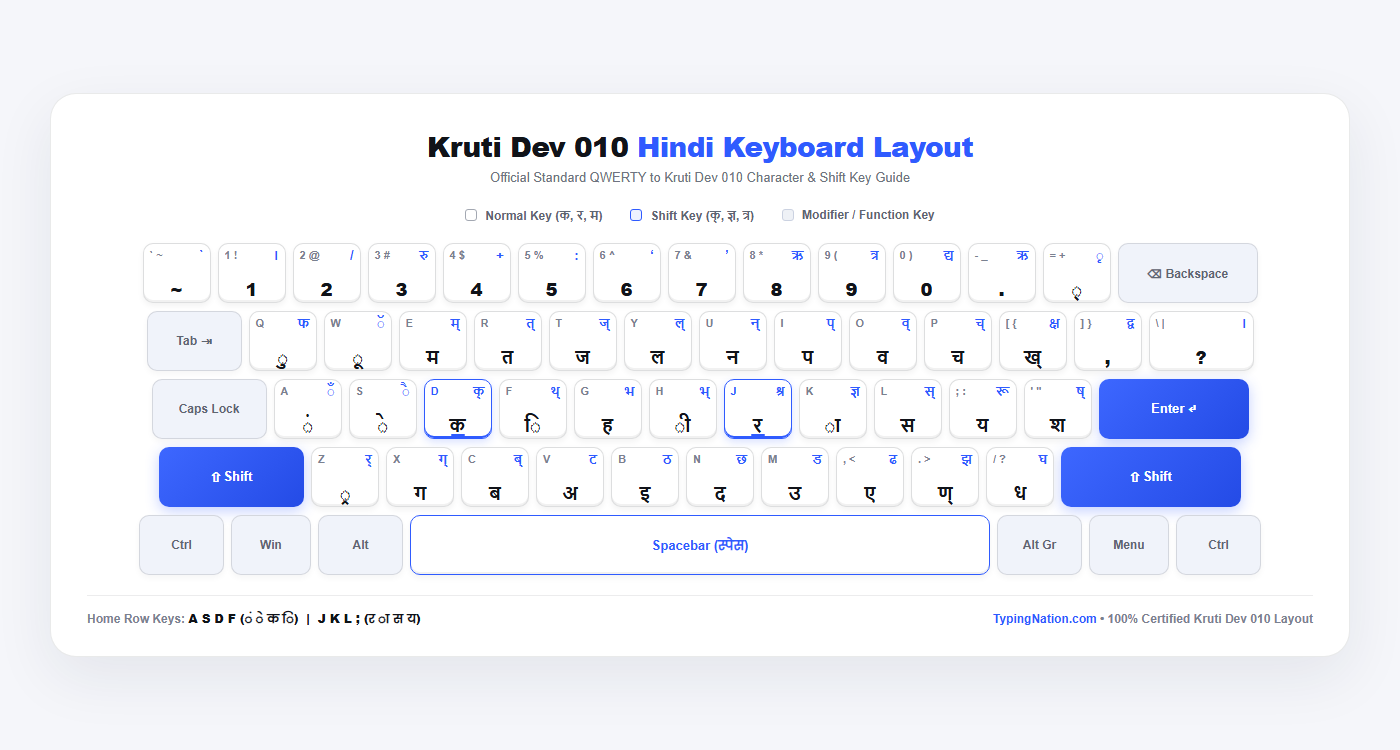
Kruti Dev 010 Keyboard Layout & Character Chart

Master every character position for your kruti dev 010 typing test. Study the layout visual below and use the complete Shift & No-Shift keystroke table for swift muscle memory development.

Certified Layout Reference

Kruti Dev 010 Hindi Keyboard Layout Diagram

Standard QWERTY to Kruti Dev 010 key mapping matching official government examination software.

Kruti Dev 010 Hindi Keyboard Layout Diagram

COMPLETE KEYSTROKE MATRIX

Kruti Dev 010 Keyboard Chart (Shifted & Normal)

All QWERTY keys with their exact No-Shift character, Shift + Key character, phonetic sound, and official Hindi typing notes.

QWERTY Key No Shift Character Shift + Key Character Notes & Sound
Home Row Keys (Finger Anchor Position — Left Hand: A S D F | Right Hand: J K L 😉
ALeft Pinky — Anuswar (बिंदी) & Chandrabindu
SLeft Ring — Chhoti E Matra & Badi Ai Matra
D Anchor Bumpक्Left Middle — Full Ka & Half Ka (आधप क)
Fिथ्Left Index — Chhoti I Matra & Half Tha (आधप थ)
GLeft Index Stretch — Full Ha & Full Bha
Hभ्Right Index Stretch — Badi EE Matra & Half Bha
J Anchor Bumpश्रRight Index — Full Ra & Joint Shra (जैसे 'श्रीमान')
Kज्ञRight Middle — Aa Matra (Danda) & Gya (ज्ञान)
Lस्Right Ring — Full Sa & Half Sa (आधप स)
;रूRight Pinky — Full Ya & Bada Roo (रू)
'ष्Right Pinky Reach — Talavya Sha & Murdhanya Sha
Top Row Keys (Upper Reaches — Q to P & Brackets)
QLeft Pinky — Chhota U Matra & Full Pha
WLeft Ring — Bada OO Matra & Chandra (ॅ)
Eम्Left Middle — Full Ma & Half Ma (आधप म)
Rत्Left Index — Full Ta & Half Ta (आधप त)
Tज्Left Index Reach — Full Ja & Half Ja (आधप ज)
Yल्Right Index Reach — Full La & Half La (आधप ल)
Uन्Right Index — Full Na & Half Na (आधप न)
Iप्Right Middle — Full Pa & Half Pa (आधप प)
Oव्Right Ring — Full Va & Half Va (आधप व)
Pच्Right Pinky — Full Cha & Half Cha (आधप च)
[ख्क्षRight Pinky Ext — Half Kha & Joint Ksha (क्षेत्र)
],द्वRight Pinky Ext — Comma (अल्पविराम) & Joint Dva (द्वार)
\?Right Pinky Ext — Question Mark & Poorna Viram (।)
Bottom Row Keys (Lower Row — Z to /)
Z्रर्Left Pinky Down — Paden Rakar (क्रम) & Reph (धर्म)
Xग्Left Ring Down — Full Ga & Half Ga (आधप ग)
Cब्Left Middle Down — Full Ba & Half Ba (आधप ब)
VLeft Index Down — Vowel 'A' & Full Ta (टमाटर)
BLeft Index Right Down — Vowel 'I' & Full Tha (ठठेरा)
NRight Index Left Down — Full Da (दवा) & Full Chha (छाता)
MRight Index Down — Vowel 'U' & Full Da (डमरू)
,Right Middle Down — Vowel 'E' (एक) & Full Dha (ढोलक)
.ण्Right Ring Down — Half Nna (आधप ण) & Full Jha (झंडा)
/Right Pinky Down — Full Dha (धनुष) & Full Gha (घर)
Number Row (Digits & Diacritics — 1 to = )
11Digit 1 & Poorna Viram
22/Digit 2 & Slash Symbol
33रुDigit 3 & Compound Ru (रुपया)
44+Digit 4 & Plus Sign
55:Digit 5 & Visarga (:)
66Digit 6 & Left Single Quote
77Digit 7 & Right Single Quote
88Digit 8 & Vowel Ri (ऋषि)
99त्रDigit 9 & Joint Tra (त्रिशूल)
00द्यDigit 0 & Joint Dya (विद्या)
-.Fullstop Dot & Ri Matra
=Halant (्) & Ri Matra (कृपा)

SPECIAL CHARACTERS GUIDE

Alt Codes for Special Characters Table

Government exams like UPSSSC, RSMSSB, and Allahabad High Court frequently test these special Kruti Dev 010 Alt key combinations. Type while holding down the Alt key on your numeric keypad.

Hindi Character Alt Code Character Name & Description Usage Example in Words
क्रAlt + 0216क + र पदेन संयुक्त वर्णक्रम, क्रांति, क्रमांक, विक्रम
त्तAlt + 0204आधा त + त संयुक्त वर्णउत्तर, पत्ता, संपत्ति, उत्तरदायी
ट्रAlt + 0217ट + र पदेन रकारट्रक, राष्ट्र, ट्रेन, ड्राफ्ट
द्यAlt + 0170द + य संयुक्त वर्णविद्या, उद्योग, विद्यार्थी, विद्यालय
द्धAlt + 0205द + ध संयुक्त वर्णबुद्ध, युद्ध, शुद्ध, प्रासिद्ध
द्गAlt + 0161द + ग संयुक्त वर्णउद्गम, उद्गार, मद्गुरू
ह्नAlt + 0227ह + न संयुक्त वर्णजाह्नवी, चिह्न (वैकल्पिक)
ह्यAlt + 0228ह + य संयुक्त वर्णसह्य, बाह्य, असह्य
ह्मAlt + 0226ह + म संयुक्त वर्णब्रह्मा, ब्राह्मण, ब्रह्मांड
ह्लAlt + 0229ह + ल संयुक्त वर्णप्रह्लाद, आह्लाद
Alt + 0188ऋ (ऋषि स्वर वर्ण)ऋषि, ऋण, ऋतु, ऋषभ
दृAlt + 0211द + ृ की मात्रादृष्टि, दृश्य, दृष्टिकोण
रूAlt + 0165र + बड़े ऊ की मात्रारूप, रूपया, डमरू
श्रAlt + 0218श + र संयुक्त वर्ण (वैकल्पिक)श्रीमान, श्रम, श्रमिक, विश्राम
Alt + 0145बायाँ सिंगल उद्धरण चिन्ह‘आरंभ’
Alt + 0146दायाँ सिंगल उद्धरण चिन्ह‘समाप्त’
Alt + 0147बायाँ डबल उद्धरण चिन्ह“सत्यमेव जयते”
Alt + 0148दायाँ डबल उद्धरण चिन्ह“उद्धरण”

EXAM-ENGINEERED PLATFORM

Why Typing Nation's Kruti Dev Platform Works

Here's what makes this online kruti dev hindi typing test platform and our dedicated krutidev typing test online fundamentally different from generic Hindi typing test tools:

Fixed Kruti Dev 010 Key Positions

Every session uses the exact character mapping state exam recruitment boards deploy. Your muscle memory develops around the precise layout you will face on exam day, completely eliminating layout mismatch risks.

Choose Your Own Passage or Use Provided Text

Select from curated kruti dev typing test passage options at easy, medium, or hard difficulty, or paste your own paragraph to master domain-specific administrative vocabulary. This flexibility replicates real exam content precisely.

Customizable Timer Settings

Pick from preset durations (1, 2, 3, 5, or 10 minutes) or enter custom minutes. Since prominent state exams run 10-minute typing sessions, you can train under realistic countdown pressure on this krutidev typing test online.

Focused Typing Mode

Activate distraction-free mode with a single click and press Esc to exit. This replicates the strict, controlled examination environment where nothing competes for your visual attention.

Instant Free Results & Analytics

The moment your timer ends, you receive Net WPM, accuracy percentage, and a character-by-character mistake analysis in an instant popup modal. No registration required, no paywall, and zero waiting.

Behind-the-Scenes Unicode Verification

Our platform renders your typed text in modern Unicode in real time. This ensures you can confirm that the Devanagari script characters you intended actually match what you typed—indispensable since Kruti Dev maps visual glyphs over ASCII characters.

STEP-BY-STEP WORKFLOW

How It Works

Getting started takes less than a minute. The process is straightforward and accurately mirrors real government typing test conditions.

Step 1

Setup Your Practice Session

Visit the online kruti dev hindi typing test page, launch your targeted kruti dev 010 typing test, select the Kruti Dev keyboard layout, and choose an exam-curated kruti dev typing test passage from the built-in library or paste your own text. Then set your timer duration—use a preset or type in custom minutes that match your target exam specification.

Step 2

Start Typing with Real-Time Guidance

The timer starts automatically on your first keypress, just like in a government typing exam. Use your normal English keyboard while the on-screen Kruti Dev mapping shows you exactly which key to press. Kruti Dev typing requires memorization of specific key placements, but our interactive guide accelerates learning so you can start typing immediately.

Enter focused mode to remove all distractions. Your fingers stay on the home row, and the platform highlights each character as you type, flagging mistakes in real time so you can adjust your cadence.

Step 3

Get Instant Performance Analysis

When your session concludes, you receive a complete performance scorecard:

  • WPM Calculation: Typing speed is measured in words per minute (WPM), where WPM is calculated by dividing typed words by time in minutes. Every five correct characters count as one word.
  • Accuracy Percentage: A common accuracy benchmark is 90% for typing tests. Your exact accuracy ratio is calculated and displayed instantly.
  • Detailed Mistake Breakdown: See exactly which characters you mistyped, your total error count, and which matras or conjuncts require additional practice drills.
  • Unicode Conversion: View the Unicode version of your typed text to confirm genuine Hindi output, overcoming Kruti Dev's legacy ASCII mapping limitations.

COMPETITIVE ADVANTAGE

What Makes Us Different

Most typing practice websites focus on generic features. Typing Nation focuses entirely on government examination outcomes.

Reliability

Exam-Consistent Layout

We use fixed Kruti Dev 010 positions that match what state recruitment boards deploy. Other platforms often use modified mappings that create costly confusion on exam day.

Hardware Agnostic

No Special Keyboard Required

The on-screen mapping works with any standard English QWERTY keyboard. You do not need Hindi-printed keycaps or specialized software. Google Input Tools allows typing in Hindi using an on-screen keyboard for general use, but our mapping is specifically calibrated for the Kruti Dev font layout used in exams.

Technology

Unicode Verification Built In

Since Kruti Dev text fails to display properly if the font is changed or missing on modern devices, seeing the Unicode result alongside your Kruti Dev output ensures you know exactly what you typed.

Versatility

Multiple Layout Support

Beyond Kruti Dev, we support Mangal Inscript, Remington Gail, and Remington CBI layouts. If your exam notification changes the required layout, you can switch seamlessly on the same platform.

Exam Alignment

Built for Indian Government Exams

Timer options, passage difficulty levels, and accuracy tracking are all designed around actual requirements for LDC, DEO, and clerk typing tests conducted by bodies like UPSSSC, RSMSSB, High Courts, and state commissions.

FREQUENTLY ASKED QUESTIONS

Frequently Asked Questions (FAQ)

Comprehensive answers to common questions about Kruti Dev 010 typing, government exam speed cutoffs, keyboard requirements, and scoring formulas.

What WPM speed do I need for government jobs?

Most state government exams in India require between 25 and 35 WPM in Hindi. For example, UPSSSC and similar state commissions typically set the qualifying bar at 25–30 WPM for clerical roles, while more competitive positions—like Rajasthan High Court LDC—demand 35 WPM. Central exams (SSC CHSL, RRB NTPC) using Unicode Inscript generally require around 30 WPM. Hindi typing tests assess both speed and accuracy, so meeting the speed threshold alone is not enough. A common accuracy benchmark is 90% for typing tests, and many official notifications explicitly allow no more than 10% errors. Always check your specific recruitment notification for exact criteria.

Can I use a normal English keyboard for this Kruti Dev 010 typing test?

Yes. You do not need a special Hindi keyboard or stickers. Typing Nation maps Kruti Dev characters directly to your standard physical English QWERTY keyboard and displays the interactive layout on screen. While India Typing offers Hindi typing using QWERTY as well, our platform specifically replicates the exact Kruti Dev 010 key positions used in government exam software. Just look at the visual guide, and your regular keyboard works perfectly. Software like Sonma Typing Expert offers exercises for Hindi typing improvement, and Typing Tutor helps beginners, but for exam-specific Kruti Dev practice with real-time analytics, our krutidev typing test online is purpose-built.

How is typing speed and accuracy calculated in the Kruti Dev test?

Typing speed is measured in words per minute (WPM). The standard formula divides total correct typed characters by five (since five keystrokes equal one "word"), then divides that figure by the total minutes typed. This calculates gross speed. In government exams, errors are penalized: mistakes reduce your net score, and exceeding allowed error thresholds can lead to disqualification. That is why our platform emphasizes real-time accuracy tracking and character-level error diagnostics alongside your net WPM calculation.

What's the difference between Kruti Dev and Mangal InScript?

Kruti Dev is a non-Unicode font that relies on legacy character mapping—pressing an English key produces an ASCII code that only displays as Hindi when the Kruti Dev font is installed. Mangal is a Unicode font where each Hindi character has a unique digital code, ensuring consistent display across all devices and the web. Their layouts also differ: Kruti Dev uses a Remington-style typewriter layout, whereas Mangal uses the standardized InScript keyboard. If your exam notification specifies "Kruti Dev" or "Remington," practice here on this page. If it states "Mangal" or "InScript," switch to our Mangal InScript test.

Is Kruti Dev still relevant for government typing exams?

Yes, significantly so. Many state recruitment exams across Uttar Pradesh, Rajasthan, Madhya Pradesh, Bihar, and Himachal Pradesh continue to require Kruti Dev 010. However, central government recruitment and digital governance initiatives are gradually moving towards Unicode fonts. The best strategy is to check your official vacancy notification, identify the mandatory font and layout, and train specifically on that layout.

Can I practice with my own custom Hindi paragraph or passage?

Yes. Select the My Paragraph option in the test console. Paste your target exam passage or custom text, verify the automatic word and character count, set your timer (1 to 10 minutes), and start typing immediately with Kruti Dev 010 key positions.

How do I type special conjunct characters like क्र, त्त, and ट्र?

In Kruti Dev 010, certain compound characters cannot be typed with a single keypress and require Alt numeric codes on your physical numpad. For example: Alt + 0216 generates क्र, Alt + 0204 produces त्त, and Alt + 0217 produces ट्र. Refer to the Alt Codes table above for the complete reference list.

READY FOR YOUR GOVERNMENT EXAM?

Practise with the exact layout your exam requires.

Switch effortlessly between India's top recruitment typing layouts or restart your kruti dev 010 typing test session above.